

- 注册 / Log In
- MyAdvantech
-
产品
嵌入式电脑
- RISC/ARM运算平台
- 工业存储 SSD & Memory
- 工业无线通信模组
- 工业显示器
- 工业主板
- 嵌入式AI边缘智能工控机
- 嵌入式单板电脑 & MIO 单板
- 嵌入式工控机
- 嵌入式工控机(ARK)
- 嵌入式模块化电脑
- 嵌入式新兴行业解决方案
- 数字多媒体
- 无线电子纸解决方案
- 游戏平台方案
- 云服务 & 软件 & 操作系统
研华客制化服务
工业自动化
- Class I, Division 2 解决方案
- 电力与能源
- 工业平板电脑(PPC)
- 工业平板电脑及人机界面
- 工业物联网软件及一体机
- 嵌入式无风扇工业电脑
- 数据采集(DAQ)与控制
- 网关/远程智能终端 (RTUs)
- 无线 I/O & 传感器
- 行业认证解决方案
- 远程I/O模块
- 自动化控制器
智能通讯
- 行业解决方案
- 服务
-
合作伙伴
Business Alliance Partner
- 技术支持
- 关于研华
- 联系研华




-50/HMINavi_KV2_820x46020231211095926.png)
特点和优势
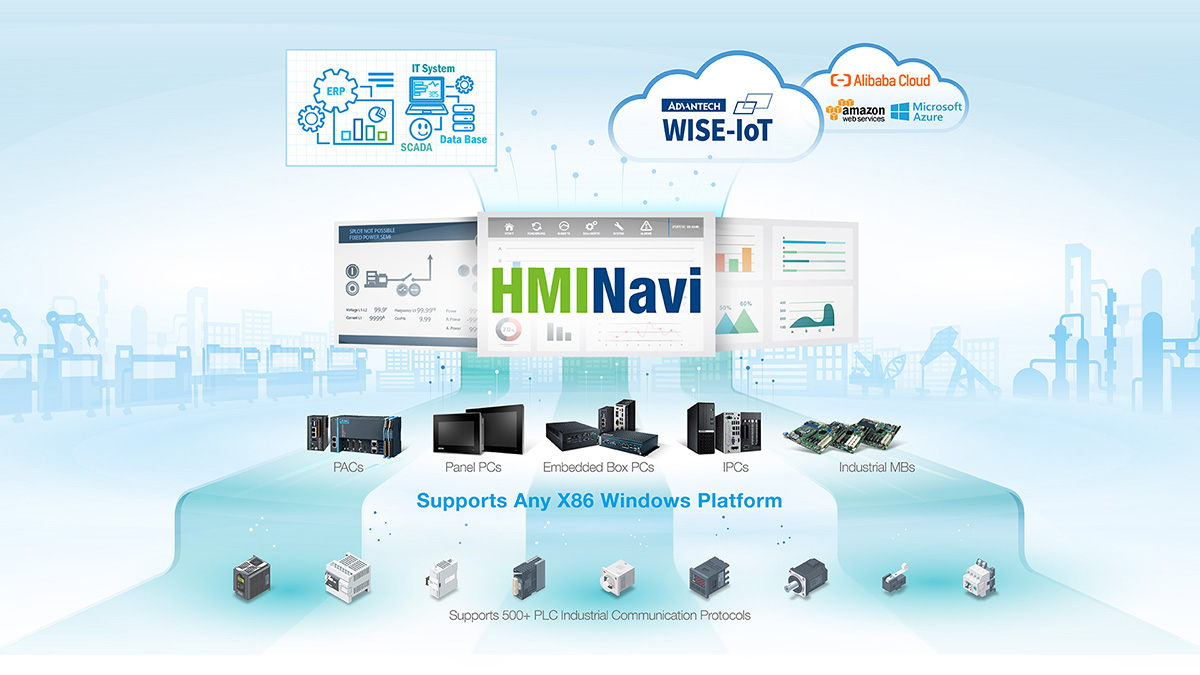
HMINavi Powers Unprecedented Intuitive Machine Visualization
HMINavi is powerful Open HMI software that encompasses an HMI Runtime Engine for HMI operations. Its HMI Engineering tool is designed with a user-friendly interface and offers solution-oriented screen objects for HMI project development.
Test Your Project on a Simulation
Explore a simulation for 60 minutes without any license key required. It is available for both online and offline use.
Seamless Connectivity Drives IoT Applications

Supports 500+ PLC Industrial Communication Protocols
HMINavi can connect up to 90% of global PLC devices. The data exchanger function can easily exchange various types of PLC data. Its powerful connectivity makes HMINavi a perfect fit for existing or future IoT solutions.

Simple Cloud Access via MQTT Protocol
HMINavi simplifies OT & IT integration using the latest MQTT uplink communication protocol. Users can effortlessly transform legacy machinery into intelligent systems, with all critical data and backups handled by cloud services.
Comprehensive Visualization Functions

Object-Oriented
- Switch Button Object Unit
- Unlimited Internal Tags
- Schedule Table Control
- Macros Script Control
- Data Exchange
- Uplink Communication

Data Visualization
- Lamps & Animated Display
- Historic Curve & Path Trend Graphic
- Bar Chart & Graphic Display
- Meter & Circular Display
- Pipeline & Path Display
- Rotation Indicator & Radar Chart

Data Management
- Alarm Management
- Historical Data Logger
- Operation Data Logger
- Recipe Management
- Documentation CSV Format
- Documentation PDF Format

Security Protection
- Project File Protection
- Screen Protection
- Due Date Protection
- Runtime Load Protection
- User Level Protection
- User Group Protection

Data Exchange
- Breakpoint Resume
- OPC UA Server/Client
- VB Script User Coding
- JScript User Coding
- Browser/Media Container
- Database Connection
Simplified 3-Step PLC Controller Integration

1. Create A Project & Link
- • Initiate a new project and create a new link.
- • Select the connection type (Serial/Ethernet).

2. Select Your PLC Model
- • Choose the PLC brand.
- • Select the PLC type/model.

3. Parameter Setup
- • Configure baud rate transmission.
- • Set up the IP address/port/sub-link.
Start Your Journey with HMINavi

Engineering Design Tool & Runtime Engine
- HMINavi Designer Software: supports Windows 7/10.
- HMINavi Runtime Engine Software: A runtime license is required for the x86 Windows platform.

Test Your Project on a Simulation
Explore the simulation for 60 minutes without any license key required. It is available for both online and offline use.